


Hotels & stays
Reservations, front desk, folios, housekeeping, rate calendar, night audit and the registers you must keep.
Hotel · Boutique hotel · Hostel · Resort · Vacation rental · Serviced apartment
EkamOS is operations software for hotels, cafés and restaurants, coworking spaces, PGs and co-living, and event venues. Each location gets the screens it needs; you see all of them together.
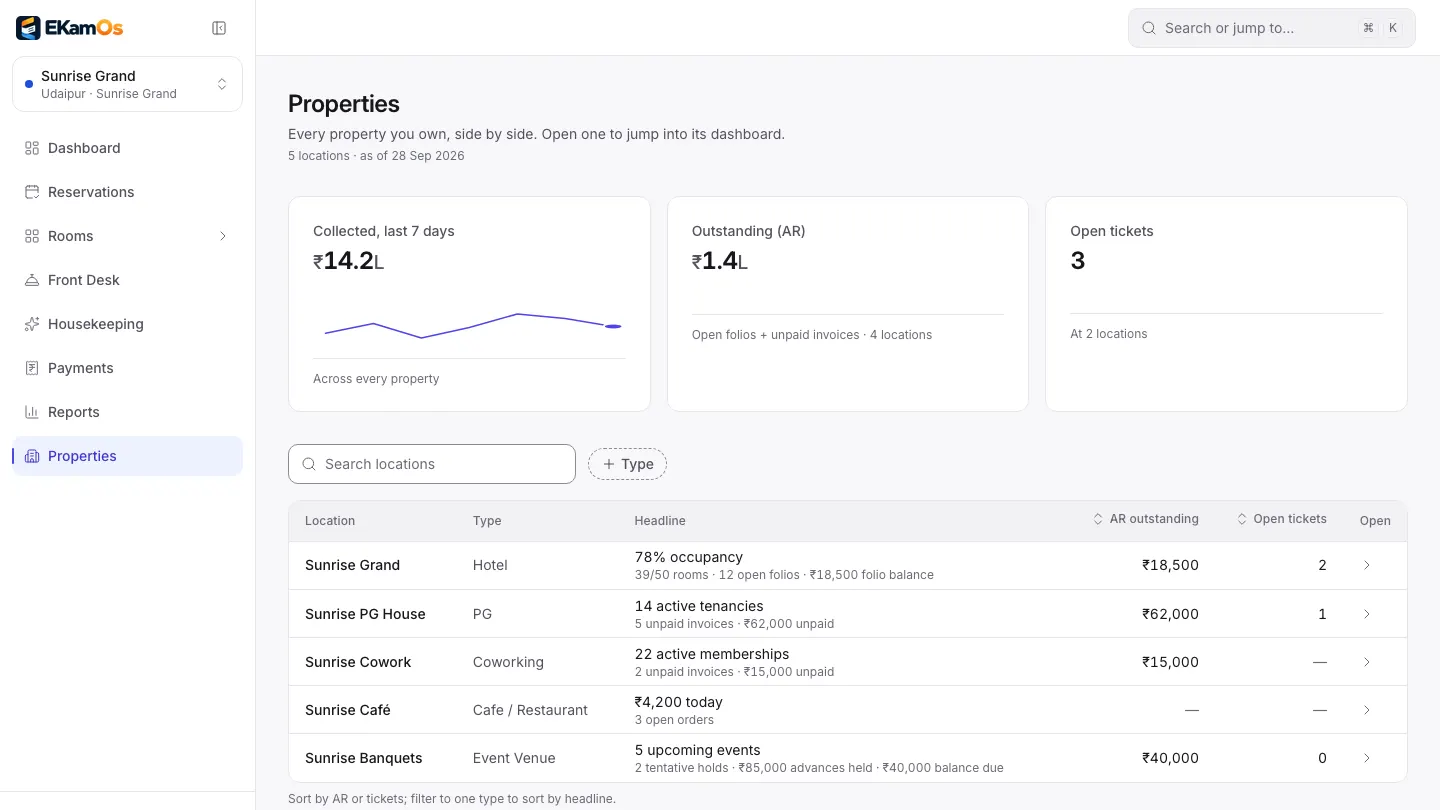
Properties page. Sample data.
EkamOS is web-based operations software for hotels, cafés and restaurants, coworking spaces, PGs and co-living, and event venues in India. It covers reservations and the front desk, a café point of sale with a kitchen display, memberships and meeting rooms, tenancies and deposits, event bookings, inventory, GST invoicing and reports, with every location under one login. It is made by Infoveritas Technologies Pvt Ltd.
What EkamOS runs
Pick the business type when a location is set up. EkamOS then shows that location the screens it needs and uses its words.
Reservations, front desk, folios, housekeeping, rate calendar, night audit and the registers you must keep.
Hotel · Boutique hotel · Hostel · Resort · Vacation rental · Serviced apartment

Point of sale, kitchen tickets and display, table map, GST bills on thermal paper, day close and food cost.
Café · Restaurant · Cloud kitchen · Food court

Memberships, seats, meeting rooms by the hour, a visitor kiosk and automatic monthly invoices.
Coworking space · Business centre

Tenancies, beds, rent invoices, deposits, tenant documents, police verification records and a tenant portal.
PG / paying guest · Student hostel · Co-living space

Spaces, packages, date holds, advances and the final GST invoice.
Event & banquet venue
A hotel with a banquet lawn, a PG with a café: add each as a location under one login, and see them side by side on the Properties page.
Tell us what you runWhy owners switch
What running a mixed hospitality business usually looks like, and what changes on EkamOS.
Without EkamOS
A hotel system for the rooms, a billing app for the café, a spreadsheet for the PG, and none of them agree.
With EkamOS
Every location lives in EkamOS under one login. Switch between them from the sidebar, or compare them side by side.
Without EkamOS
Month-end means chasing each location for what came in and what is still owed.
With EkamOS
The Properties page shows money collected, money outstanding and open issues for every location, and reports download as PDFs.
Without EkamOS
Staff can change a price, give a discount or refund a deposit, and you find out later.
With EkamOS
Rates, menu prices, deposit deductions and refunds are owner-only, checked on the server. Café discounts above your limit need a manager’s PIN.
Without EkamOS
GST invoices are typed by hand, numbered from memory and re-keyed for the accountant.
With EkamOS
Every invoice carries the CGST, SGST and IGST split and runs in sequence per financial year. Corrections are credit notes, and vouchers export to Tally.
Modules
Each location runs the modules its business needs. A café does not see room screens, and a PG does not see the kitchen display.
Reservations, check-in and check-out, guest folios, housekeeping, the rate calendar and night audit.
Dine-in, takeaway and delivery orders, a table map, split bills, discounts and GST bills on thermal paper.
Numbered kitchen tickets on a live board from New to Ready, with every ticket’s age.
Coworking members and seats, PG tenants and beds, with rent and membership invoices.
Stock, suppliers, purchase orders, goods received, recipes and food cost.
GST invoices, credit notes, online payments through Razorpay when switched on, and Tally export.
Occupancy, average daily rate, revenue per available room and café sales, with PDF export.
Roles, per-location access, attendance and leave, with prices kept owner-only.
For owners with more than one location
Independent owners in India often run a mix: rooms upstairs, a café downstairs, a PG across town. EkamOS was built for that mix.
The work, start to finish
In numbers you can check
Built for India
The CGST, SGST and IGST split, numbering in sequence per financial year, and credit notes for corrections.
Café GST bills show your legal name, GSTIN and FSSAI number, and print on 58 or 80 mm thermal paper.
Each foreign guest’s Form C record shows as due or overdue until you mark it filed.
Every adult in the room, exportable by date range as CSV or PDF.
On guest and visitor records, an Aadhaar number is stored and shown with only its last four digits.
Export vouchers to Tally as XML for your accountant.
Each PG tenant’s police verification form and status, kept with the tenancy.
Amounts in rupees with Indian digit grouping, and bills stamped in Indian Standard Time.
Connections
Some connections are built but not switched on yet. We label them that way in the app too.
| Service | Status |
|---|---|
| RazorpayOnline payment of invoices, and of café QR orders | Switched on at setup |
| TallyAccounting export (XML) | Available |
| WhatsApp BusinessMessages, automations and sending bills | Bring your own account |
| Booking.comOnline travel agency sync | Beta, not live yet |
| MakeMyTrip and GoibiboOnline travel agency sync | Beta, not live yet |
| Zoho BooksAccounting sync | Beta, not live yet |
| Pine LabsCard terminal payments | Beta, not live yet |
| Swiggy and ZomatoDelivery orders straight into the POS | Beta, not live yet |
Common asks that EkamOS does not do today. If one of these is a must for you, tell us on the demo call.
Where other sites put logos
EkamOS is new, and we would rather show you the product on a demo call than quote a hotel manager who does not exist. Every screenshot on this site uses sample data. If EkamOS works for your business and you are happy to say so, your name and your own words can go here, with your approval.
Questions
What owners ask first.
EkamOS is operations software for Indian hospitality businesses: hotels and other stays, cafés and restaurants, coworking spaces, PGs and co-living, and event venues. It runs the front desk, the point of sale and kitchen, memberships and tenancies, event bookings, inventory, GST invoices and reports, with every location you own under one login.
Sixteen business types in five groups: hotel, boutique hotel, hostel, resort, vacation rental and serviced apartment; café, restaurant, cloud kitchen and food court; coworking space and business centre; PG, student hostel and co-living space; and event and banquet venue.
Yes. Each business is a location under one login, with its own modules, data and staff access. You switch between locations from the top of the sidebar, and the Properties page shows them side by side.
Yes. EkamOS runs in a web browser, and every screen is designed to work at phone width, with light and dark themes. The café point of sale and kitchen display can also be installed on a tablet like an app. There is no app-store app for the whole of EkamOS yet.
Yes. Invoices show the CGST, SGST and IGST split, are numbered in sequence per financial year and are corrected with credit notes. You can pick a Classic, Modern or Compact layout, add your logo, UPI ID and bank details, and export vouchers to Tally as XML.
In the café, staff can keep opening orders, adding items and sending them to the kitchen; the orders are sent to the server once each when the connection is back, and payments wait until then. The rest of EkamOS needs a connection.
Not live yet. Those connections exist in the app but are labelled beta and do not sync. Razorpay for online payments and Tally export are available today, and WhatsApp works once you connect your own WhatsApp Business account.
Book a demo and tell us what you run and how many locations you have. Accounts are not self-serve: our team sets up your organisation and locations with you, picks each location’s business type and switches on the modules it needs.
Tell us what you run. We will walk you through the parts of EkamOS that fit it, and be straight about the parts that are not ready yet.